Kidslox App Review (2026): Is This Parental Control App Worth It for Families?
Kidslox is a parental control app designed to help parents manage screen time, block apps, and monitor their children’s digital activity across multiple devices.
As children spend more time online for entertainment, communication, and schoolwork, many parents are looking for tools that create healthier digital habits without turning every conversation into an argument about screen time. That’s exactly the space Kidslox tries to fill.
Unlike some parental control apps that focus heavily on surveillance, Kidslox centers its experience around simplicity and daily device management. It gives parents practical tools to limit distractions, block harmful content, and encourage more balanced technology use.
But in a crowded market filled with alternatives like Canopy, Aura, and Mobicip, does Kidslox still stand out in 2026? Let’s take a closer look.

What is the Kidslox App?
Kidslox is a parental control and screen time management app available on iOS, Android, Windows, and macOS devices.
The app is primarily designed to help parents create healthier boundaries around device usage. It allows families to manage screen time, block apps and websites, schedule downtime, and monitor online activity from a centralized dashboard.
While Kidslox includes content filtering and location tracking, its biggest strength is simplicity. The app focuses less on deep surveillance and more on helping families reduce excessive screen use in a practical, easy-to-manage way.
In many ways, Kidslox feels more like a digital parenting assistant than a strict monitoring tool.
Key Features of the Kidslox App (What Actually Matters)
Here are the most useful features of the Kidslox app:
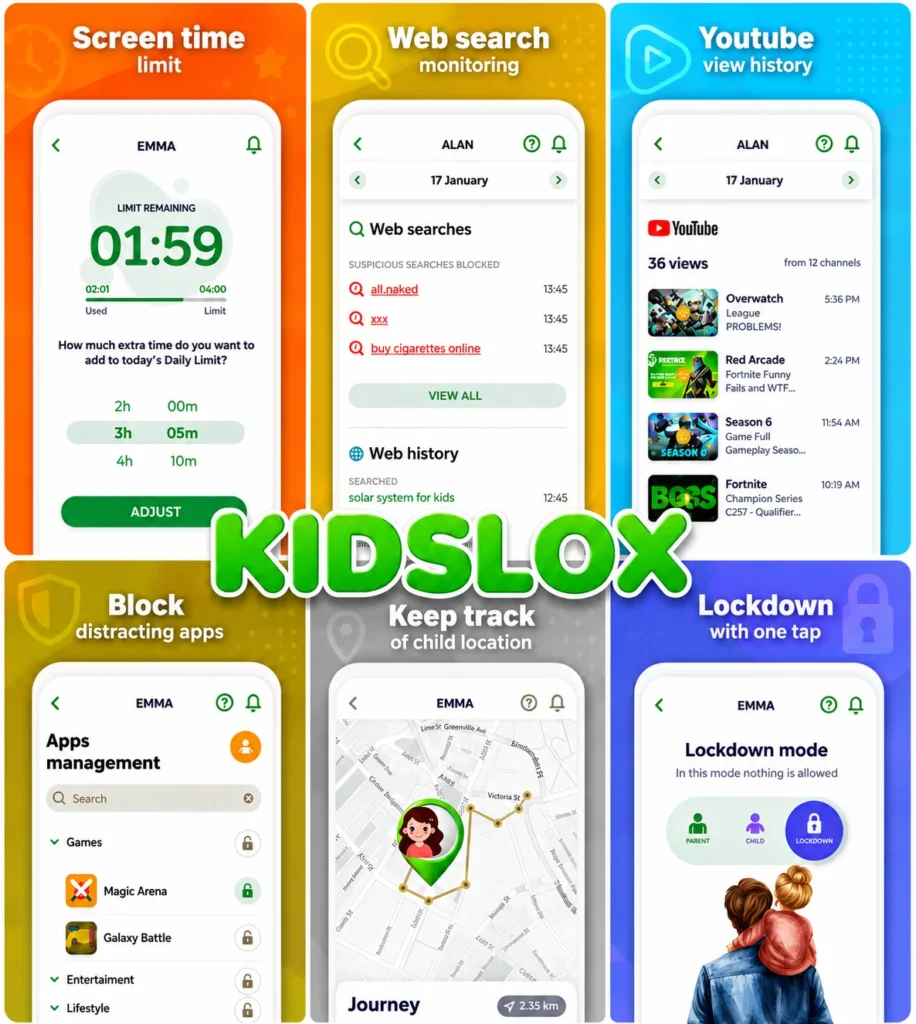
Screen Time Management
Screen time control is the core feature of Kidslox, and it’s where the app performs best.
Parents can create daily limits for device usage, schedule downtime for school or bedtime, and instantly lock devices when needed. The app also allows different rules for weekdays and weekends, which helps create more realistic routines for families.
Key tools include:
- Daily screen time limits
- Scheduled device downtime
- Instant device lock
- Separate weekday and weekend schedules
The controls are straightforward and easy to adjust, which makes the app especially useful for busy parents who want quick solutions rather than endless customization.
App Blocking and App Limits
Kidslox allows parents to block specific apps or set time limits for individual apps.
This is particularly useful for platforms like YouTube, TikTok, Instagram, or mobile games that can easily consume hours of a child’s attention. Instead of banning devices entirely, parents can guide usage more selectively.
The app strikes a good balance between flexibility and simplicity, although it does not offer the deep app analytics found in some advanced competitors.
Website Filtering
Kidslox includes web filtering tools that help block inappropriate websites and adult content.
Parents can:
- Block specific websites manually
- Use category-based filtering
- Restrict access to unsafe content
The filtering system is reliable for general family use, though it is not as advanced or AI-driven as Canopy’s real-time filtering technology.
Still, for many households, the level of protection offered here will be more than enough.
Location Tracking
The app also includes GPS location tracking so parents can see where their child’s device is in real time.
Location history and simple geofencing alerts are available, which can provide extra peace of mind during school hours or outings.
While not as detailed as dedicated family locator apps, the feature works well as part of an all-in-one parental control setup.
Cross-Platform Support
One of Kidslox’s biggest practical advantages is its broad compatibility.
The app works across:
- iPhone and iPad
- Android devices
- Windows computers
- macOS systems
This makes it easier for families with mixed devices to manage everything from a single account.
How the Kidslox App Works
Setting up Kidslox is relatively simple. Parents create an account, install the app on both their own and their child’s devices, and configure the desired restrictions and schedules.
Once connected, the app allows parents to monitor and manage activity remotely through the dashboard. Most controls update quickly, making it easy to respond to changes in routine or behavior throughout the day.
The overall setup process is beginner-friendly and doesn’t require technical expertise.
Dashboard Experience
Kidslox keeps its dashboard clean and easy to navigate.
The app prioritizes accessibility over complexity, which means parents can quickly:
- view device usage
- adjust limits
- lock devices
- review activity summaries
The interface is intentionally simple, making it approachable even for users who are unfamiliar with parental control software.
That simplicity does come with some trade-offs, though. Parents looking for detailed analytics or extensive reporting may find the dashboard somewhat basic compared to competitors like Mobicip.
Kidslox App Pricing (2026)
Kidslox offers both subscription plans and a lifetime purchase option, which helps it stand out from many competitors.
Typical pricing includes:
- Monthly plan: around $6–$8/month
- Annual plan: discounted yearly pricing
- Lifetime plan: one-time payment option
The lifetime plan is particularly appealing for families who prefer avoiding recurring subscriptions.
A free version is available, though its features are limited compared to the premium plans.
Pros and Cons of the Kidslox App
Kidslox’s greatest strength is its simplicity. It offers practical parental controls without overwhelming users with too many advanced settings. The screen time management tools are effective, the app blocking works well, and the dashboard is easy to use across multiple devices.
However, the app is less advanced in areas like AI-powered filtering, detailed monitoring, and behavioral insights. Some parents may also find the reporting features too lightweight for older children or teenagers.
Overall, Kidslox focuses more on creating healthy digital habits than deep surveillance.
Is Kidslox Safe and Legit?
Yes, Kidslox is considered a safe and legitimate parental control app.
The platform has been widely used by families for several years and provides the standard privacy protections expected from modern parental control software. Features like location tracking and activity monitoring require device permissions, but this is typical for apps in this category.
As always, parents should communicate openly with children about how and why monitoring tools are being used.
User Reviews and Real Feedback
User feedback for Kidslox is generally positive, especially among parents looking for simple screen time controls.
Many users appreciate:
- Easy setup
- Clean interface
- Reliable scheduling tools
- Cross-platform support
At the same time, some reviewers mention that the app feels basic compared to more advanced competitors. Occasional syncing delays between devices are another commonly reported complaint.
Still, most families seem satisfied with the app’s day-to-day reliability and ease of use.
Who Should Use Kidslox?
Kidslox is best suited for parents who want straightforward screen time management without dealing with overly complex settings.
It works particularly well for:
- Younger children
- Families focused on reducing screen addiction
- Parents who value simplicity over advanced analytics
However, it may not be ideal for:
- Users wanting detailed monitoring reports
- Families needing advanced AI filtering
- Parents seeking broader digital security tools
Kidslox vs Canopy vs Mobicip
Although all three apps fall under the parental control category, they focus on different priorities.
Kidslox is strongest in screen time management and simplicity. It’s designed for families who want practical controls without complexity.
Canopy focuses heavily on AI-powered content filtering and explicit image detection, making it stronger for content protection.
Mobicip offers more detailed monitoring tools, activity reports, and parental insights for users who want deeper oversight.
In short:
- Choose Kidslox for simplicity and screen time control
- Choose Canopy for smarter content filtering
- Choose Mobicip for detailed monitoring and reporting
Kidslox succeeds by keeping parental controls simple, practical, and easy to manage.
That said, the app is clearly designed with simplicity as its priority. Parents looking for more advanced monitoring, deeper activity insights, stronger filtering tools, or more comprehensive reporting may eventually outgrow what Kidslox offers. In that area, platforms like Mobicip provide a more feature-rich parental control experience while still remaining family-friendly and relatively easy to use.
Ratings (2026) for Kidslox App
- App Store: ~4.5/5
- Google Play: ~4.3/5
- Overall: 4.4/5
Why You Should Choose Kidslox
- You want easy screen time management
- You prefer simple, family-friendly controls
- You need support across multiple device types
- You like the option of a lifetime plan
Why You Might Skip It
- You want advanced monitoring and analytics
- You need AI-powered filtering features
- You prefer deeper activity tracking and reports
FAQs
Is the Kidslox app worth it?
Kidslox can be a good choice for families that mainly want simple screen time controls and an easy-to-use parental dashboard. Its strengths lie in quick setup, app blocking, and daily device scheduling.
However, parents looking for deeper insights into online activity, more detailed reports, or advanced monitoring tools may eventually find its feature set somewhat limited. Apps like Mobicip offer more comprehensive parental controls for families that want stronger visibility into digital behavior across devices.
Can Kidslox block apps completely?
Yes. Kidslox allows parents to completely block certain apps or place time limits on them. This can be useful for managing access to social media apps, streaming platforms, or mobile games during study hours or bedtime.
That said, the app focuses more on straightforward controls than advanced usage analytics. Parents who want more detailed app activity monitoring and customizable filtering may prefer platforms like Mobicip, which provide broader monitoring and reporting tools alongside app blocking.
Does Kidslox track location?
Yes. Kidslox includes GPS-based location tracking features that allow parents to see a child’s device location and review basic location history.
For many families, these tools are sufficient for everyday supervision. Users looking for more advanced parental oversight features beyond location tracking may benefit from apps like Mobicip, which combine device management, activity monitoring, and content filtering in a more comprehensive ecosystem.Is Kidslox better than Canopy?
The two apps are designed with different priorities in mind. Kidslox focuses primarily on screen time management and simple parental controls, making it appealing for families that want ease of use.
Canopy, on the other hand, is more focused on AI-powered content filtering and real-time detection of explicit material. Meanwhile, Mobicip sits somewhere in between, offering a balance of screen time management, web filtering, app controls, and detailed activity monitoring for parents who want broader oversight without excessive complexity.
Does Kidslox work on both iPhone and Android?
Yes, it supports both platforms, along with Windows and macOS devices.
Cross-platform compatibility is now fairly common among leading parental control apps, and services like Mobicip also provide multi-device support along with more advanced parental monitoring and reporting features.
Conclusion
Kidslox doesn’t try to reinvent parental controls. Instead, it focuses on helping families build healthier digital habits with tools that are simple, reliable, and easy to use every day.