AirDroid Parental Control App Review (2026): Is This Family Monitoring App Worth It?
AirDroid Parental Control is a family monitoring app that offers screen time controls, app monitoring, website filtering, location tracking, and live device supervision tools. While it provides extensive visibility into children’s digital activity, its advanced monitoring features may feel overly intensive for families looking for lighter parental controls.
As children spend more time online through smartphones, tablets, and social media apps, many parents are searching for tools that offer better visibility into digital habits without becoming overly complicated. AirDroid positions itself as a feature-rich parental control solution that combines monitoring tools with device management and safety alerts.
Unlike apps that focus mainly on content filtering, AirDroid leans more toward real-time monitoring and remote supervision. It offers everything from app usage reports to live screen monitoring, making it one of the more hands-on parental control apps available in 2026.
But does all that functionality actually make it better or just more overwhelming? Let’s take a closer look.
What is AirDroid Parental Control App?
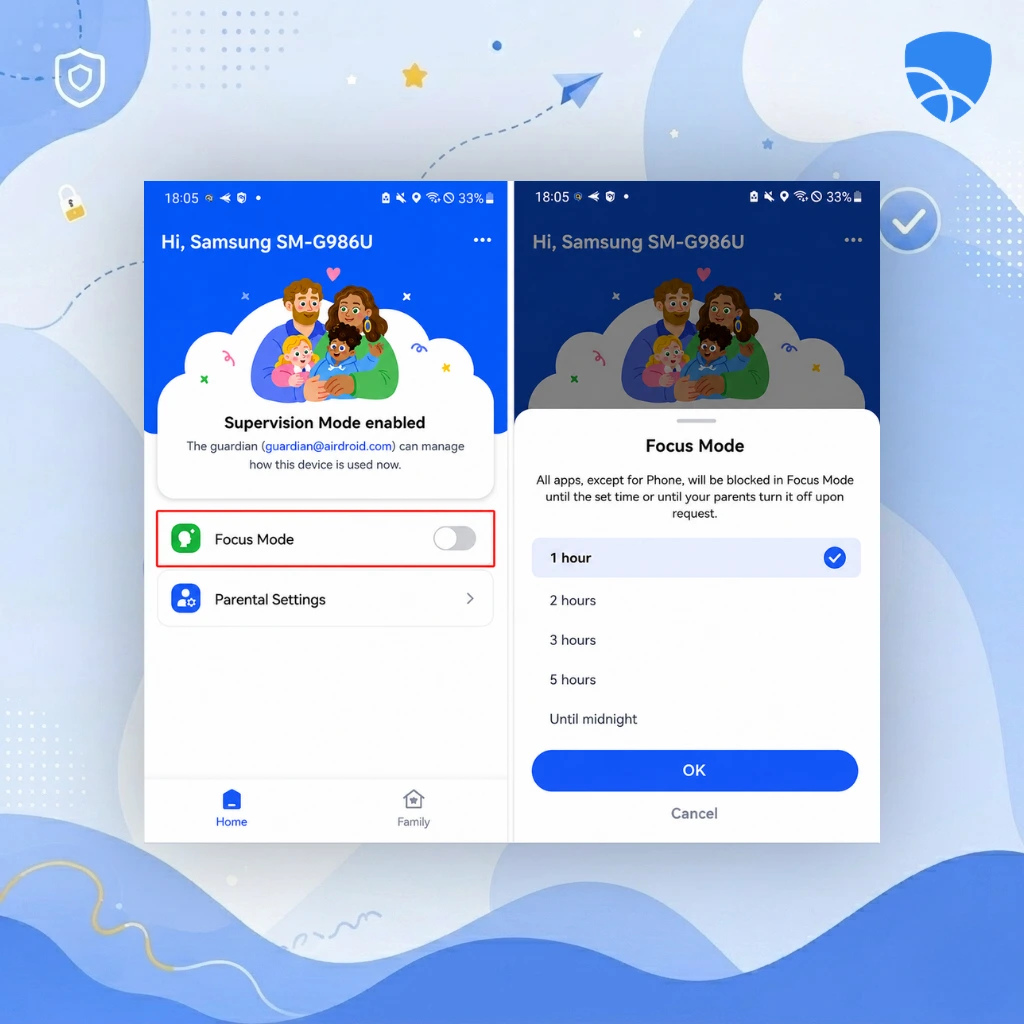
AirDroid Parental Control is a parental monitoring and device management app available on Android and iOS devices.
The platform is designed to help parents supervise their children’s smartphone activity through tools like app monitoring, screen time controls, website filtering, location tracking, and remote device access. It also includes features like live screen viewing and camera monitoring, which set it apart from many traditional parental control apps.
In simple terms, AirDroid gives parents deeper visibility into how their children use their devices on a daily basis.
For some families, that level of oversight can feel reassuring. For others, it may feel a bit too intensive.
What Features Does AirDroid Parental Control Offer?
AirDroid offers features such as screen time management, app monitoring, website filtering, live screen viewing, GPS location tracking, geofencing, remote camera access, and audio monitoring. These tools provide parents with detailed visibility and control over their child’s digital activity and device usage.
Screen Time Management in AirDroid Parental Control App
AirDroid includes flexible screen time tools that help parents manage how long children can use their devices.
Parents can:
- Set daily usage limits
- Create schedules for school, sleep, or homework hours
- Lock devices remotely when needed
- Restrict access during specific times of day
The controls are easy to configure and work reliably across supported devices.
For families struggling with excessive screen usage, this remains one of AirDroid’s strongest practical features.
App Monitoring and Usage Reports
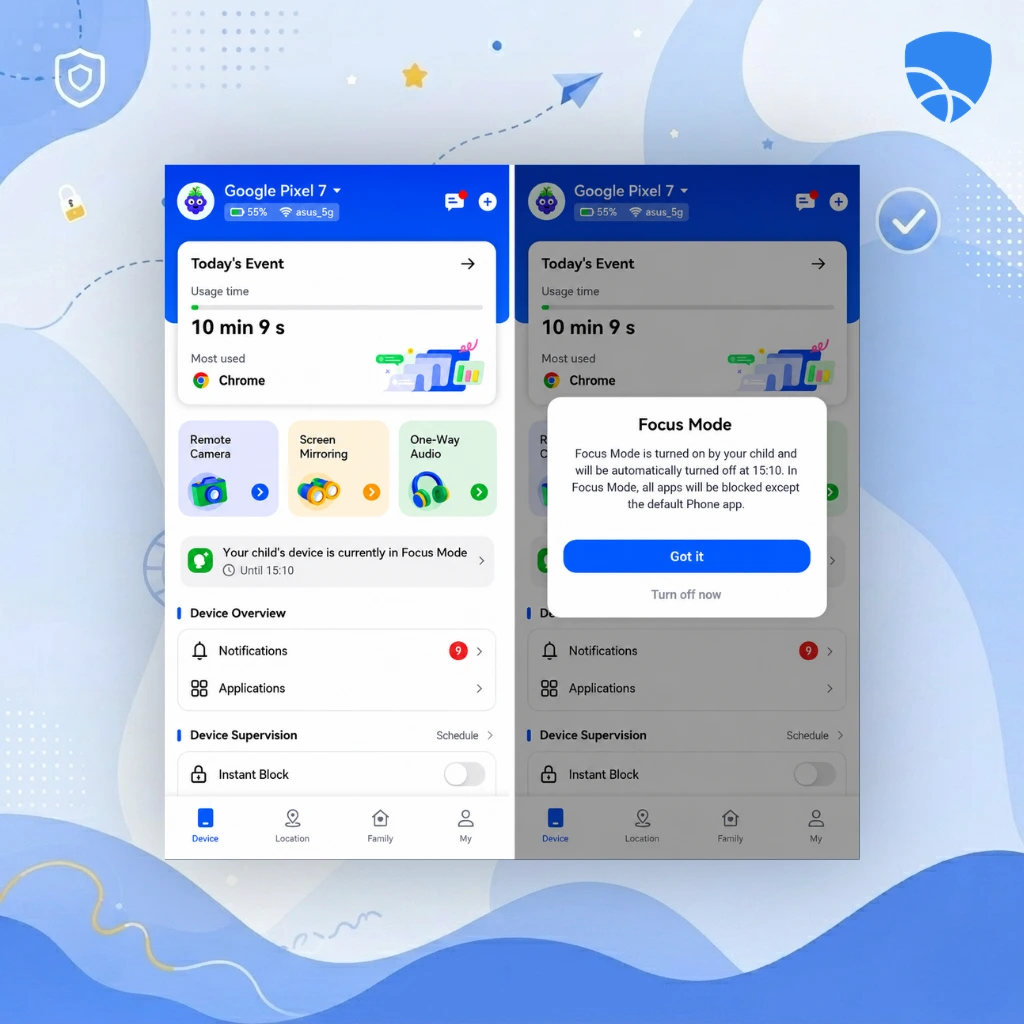
One of AirDroid’s standout features is its detailed app monitoring system.
The app allows parents to:
- View which apps are being used
- Monitor app usage duration
- Receive alerts for newly installed apps
- Block selected apps remotely
This level of visibility is more advanced than what many simpler parental control apps provide.
Rather than just limiting usage, AirDroid helps parents understand digital behavior patterns over time.
Live Screen Monitoring in AirDroid Parental Control App
This is the feature that makes AirDroid feel significantly more hands-on than competitors like Kidslox or Canopy.
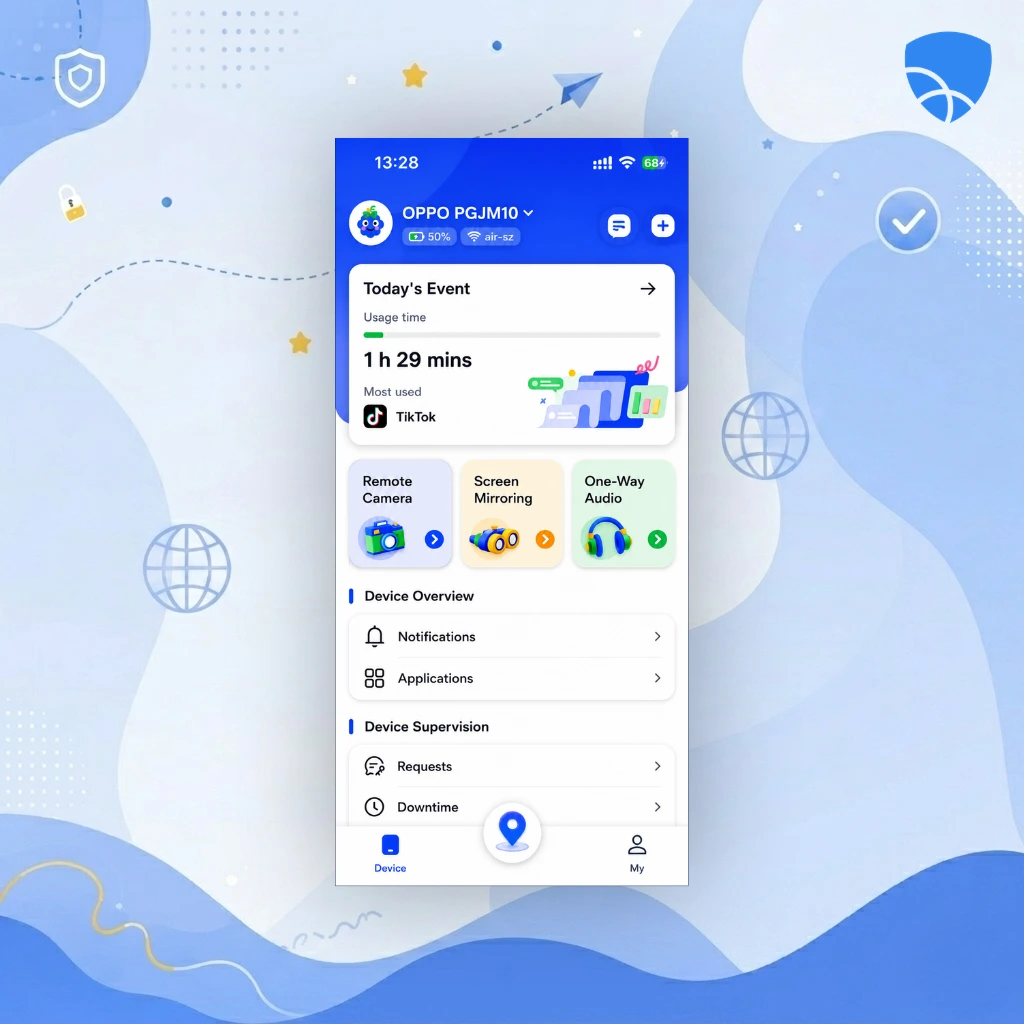
Parents can remotely view their child’s device screen in real time directly from their own phone. This can help during situations involving online safety concerns, suspicious behavior, or excessive social media usage.
While some families may appreciate the extra transparency, others may find it intrusive depending on how it’s used.
Website Filtering and Content Blocking in AirDroid Parental Control App
AirDroid includes website filtering tools that help block harmful or inappropriate content.
Parents can:
- Block specific websites manually
- Filter content categories
- Restrict access to adult or unsafe sites
The filtering system works well for general family protection, though it is not as advanced as Canopy’s AI-powered image filtering system.
Location Tracking and Geofencing in AirDroid Parental Control App
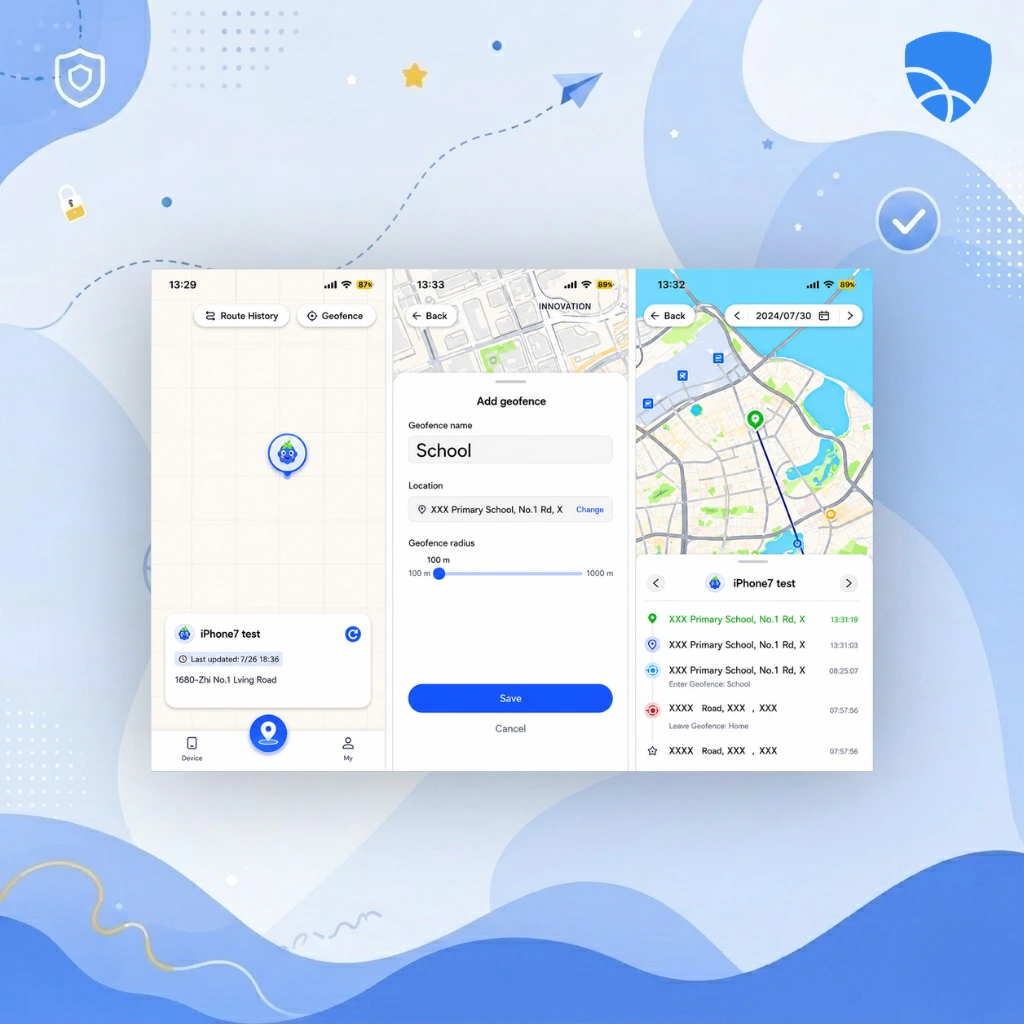
Location tracking is another major part of the AirDroid experience.
The app allows parents to:
- Track their child’s real-time GPS location
- View location history
- Create geofencing zones
- Receive alerts when a child enters or leaves specific locations
For many families, this feature provides additional peace of mind during school hours, travel, or outings.
Remote Camera and Audio Features
AirDroid also includes remote camera and one-way audio monitoring tools.
Parents can:
- Access the child device’s camera remotely
- Listen to surrounding audio in real time
These features are primarily marketed as safety tools, particularly during emergencies or when checking a child’s surroundings.
However, they also raise understandable privacy concerns and may feel excessive for some households.
How Does the AirDroid Parental Control App Work?
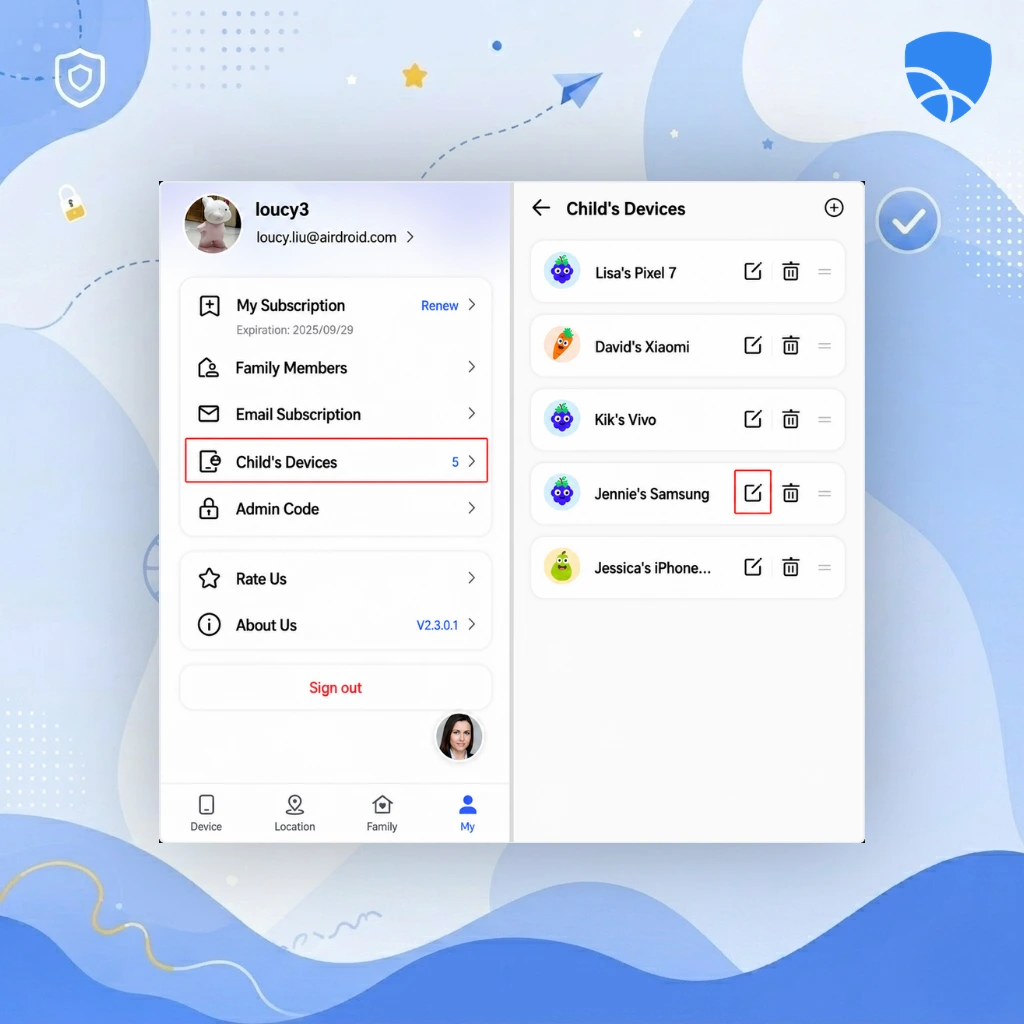
AirDroid works by connecting a parent app and child device through permissions that allow remote monitoring and management. Once installed, parents can review activity reports, monitor app usage, track locations, receive alerts, and manage restrictions directly from the dashboard.
Setting up AirDroid requires installing the parent app on the guardian’s device and the companion app on the child’s device.
After permissions are granted, parents can monitor activity remotely through the dashboard. The app continuously syncs information, allowing parents to review usage, receive alerts, and adjust restrictions in real time.
The setup process takes slightly longer than simpler apps because of the number of permissions required for advanced monitoring features.
Dashboard Experience
AirDroid’s dashboard is feature-rich and information-heavy.
Parents can quickly access:
- Screen time reports
- App usage statistics
- Location tracking
- Alerts and notifications
- Remote monitoring tools
Despite the large number of features, the interface remains fairly organized and easy to navigate.
Still, compared to more minimalist apps like Kidslox, AirDroid can initially feel overwhelming for users who prefer simpler controls.
How Much Does AirDroid Parental Control Cost in 2026?
AirDroid offers both free and premium plans, with most advanced monitoring tools available through paid subscriptions. Premium plans include features such as remote screen viewing, advanced alerts, and extended location history, making the app competitively priced for families seeking extensive supervision features.
Typical pricing includes:
- Monthly plan: around $10/month
- Annual plan: discounted yearly pricing
Premium plans unlock:
- Unlimited monitoring
- Remote screen viewing
- Advanced alerts
- Extended location history
The pricing is fairly competitive considering the number of monitoring tools included.
What Are the Pros and Cons of AirDroid Parental Control?
AirDroid’s biggest strength is the depth of its monitoring capabilities. It provides parents with extensive visibility into device usage, app activity, and real-time behavior. Features like live screen viewing and geofencing make it one of the more comprehensive parental control apps available.
However, that same depth can also become its biggest drawback. Some users may find the monitoring tools overly invasive, and the app requires extensive permissions to function fully. The dashboard can also feel busy compared to simpler alternatives.
Overall, AirDroid is designed more for active supervision than light-touch parental guidance.
Is AirDroid Parental Control App Safe and Legit?
Yes, AirDroid is considered a legitimate parental control and device management platform.
The app has been widely used for remote device management and family monitoring for several years. Its parental control tools rely on device permissions that are standard for apps in this category.
That said, because AirDroid offers advanced monitoring features like remote screen access and audio monitoring, families should use the app transparently and responsibly.
What Do Real Users Say About AirDroid Parental Control?
User feedback for AirDroid is generally positive, particularly among parents who want detailed monitoring features.
Users commonly praise:
- Real-time alerts
- Location tracking accuracy
- App monitoring tools
- Remote screen viewing
At the same time, some users mention:
- Battery drain on monitored devices
- Complicated setup permissions
- Concerns about privacy and over-monitoring
Overall, most users agree that AirDroid is powerful—but definitely more intensive than basic parental control apps.
Who Should Use AirDroid?
AirDroid is best suited for parents who want deeper supervision and real-time visibility into their child’s device activity.
It works especially well for:
- Parents of teenagers
- Families concerned about online safety risks
- Users who want detailed monitoring and alerts
However, it may not be ideal for:
- Parents seeking lightweight screen time controls
- Families prioritizing privacy and independence
- Users who prefer simpler interfaces
How Does AirDroid Compare to Canopy and Mobicip?
AirDroid, Canopy, and Mobicip focus on different aspects of parental control. AirDroid emphasizes real-time monitoring and supervision, Canopy specializes in AI-powered content filtering, and Mobicip offers balanced parental controls with monitoring tools designed to feel less surveillance-heavy for families.
Although all three apps focus on family digital safety, their approaches are very different.
AirDroid is strongest in real-time monitoring and device supervision. It offers the deepest visibility into device activity and location tracking.
Canopy focuses more on AI-powered content filtering and preventing exposure to explicit material.
Mobicip sits somewhere in the middle, offering strong parental controls and monitoring tools without feeling as surveillance-heavy as AirDroid.
In short:
- Choose AirDroid for advanced monitoring and supervision
- Choose Canopy for smarter content filtering
- Choose Mobicip for balanced parental controls and reporting
Final Verdict
AirDroid is a feature-packed parental control app Its extensive monitoring tools, live tracking features, and remote supervision capabilities make it especially appealing for parents who want maximum visibility into their child’s digital activity.
At the same time, the app’s intensity may not suit every family. Some users will appreciate the level of control, while others may find it excessive for everyday parenting.
Ultimately, AirDroid works best for families who prioritize active supervision over minimal intervention.
Ratings (2026)
- App Store: ~4.5/5
- Google Play: ~4.4/5
- Overall: ⭐ 4.5/5
Why You Should Choose AirDroid
- You want detailed device monitoring
- You need strong location tracking and alerts
- You value real-time supervision tools
- You prefer feature-rich parental controls
Why You Might Skip It
- You prefer lighter, less invasive controls
- You want simpler setup and management
- You are uncomfortable with intensive monitoring features
FAQs
Is the AirDroid parental control app worth it?
Yes, especially for parents who want detailed monitoring and real-time supervision tools.
Can AirDroid monitor apps and screen activity?
Yes, it includes app monitoring, usage reports, and live screen viewing.
Can AirDroid monitor GPS tracking and geofencing alerts?
Yes, the app offers real-time GPS tracking and geofencing alerts.
Is AirDroid better than Canopy?
They focus on different areas. AirDroid is stronger for monitoring, while Canopy is stronger for AI-powered content filtering.
Does AirDroid work on iPhone and Android?
Yes, though some advanced features work better on Android due to operating system permissions.
Conclusion
AirDroid doesn’t take a minimalist approach to parental controls. Instead, it gives parents deep visibility into their child’s digital world offering powerful supervision tools for families who want more than just basic screen time management.