Articles in this section
How to add a shared admin/parent in my Mobicip account?
- Does Mobicip offer live Call or Chat Support?
- Why is my customized setting not working on my child device?
-
How to add a shared admin/parent in my Mobicip account?
- How to add a new device?
- How do I view my child's online activities?
- How do I block all devices instantly?
- What is blocked during Sleep Time?
- Why isn’t your child’s location updating?
- How do Mobicip app time limits work on iOS devices?
Mobicip lets the account owner invite another trusted adult, such as a co-parent or a guardian, to help manage the account.
To add a co-parent or admin:
Open the Mobicip Parent app > My Family > Family Members > Add Co-Parent > Enter the person’s name and email address.
You can then choose:
- The child profiles that the co-parent can monitor.
- The level of protection and control they have in the account.
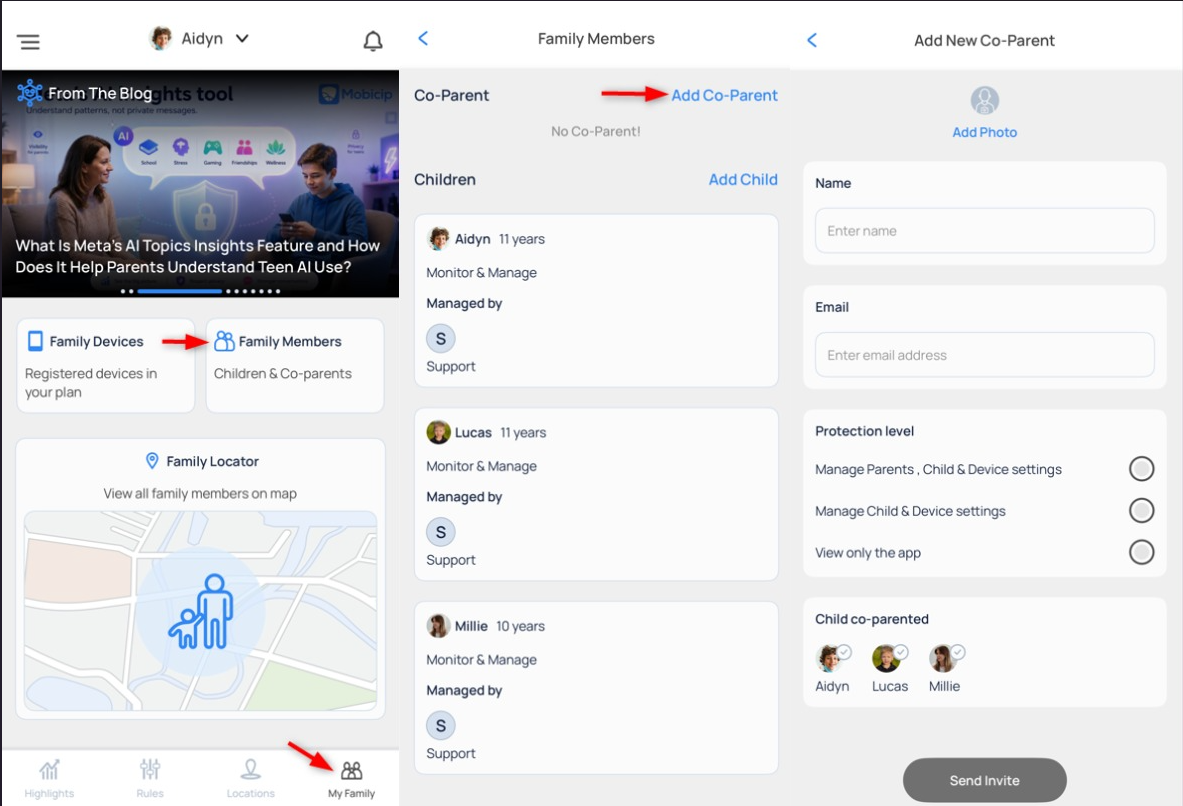
Tap Send Invite to complete the process. The co-parent will receive an invitation email with a link to create or connect their Mobicip account.
Good to know
- The co-parent must use the invite link sent by email to successfully connect to your Mobicip account.
- You can update or remove a co-parent’s access anytime from My Family settings.
- Co-parents will only see and manage the child profiles and controls you’ve allowed.
Have more questions ?