Android(coded)
Android Parental Controls for Busy &
Involved
Parents
Big Tech loves to keeps your child engaged 24x7.
Smart parents like you know better.
Smart parents like you know better.



Keep in Touch With Your Family's Digital Life
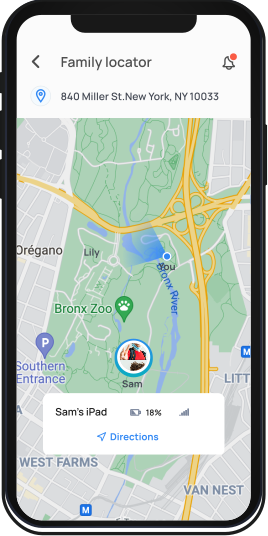
Track Location
Set geofences & locate your kids on demand
Monitor Social Media
Get alerted on risky interactions on Facebook & Snapchat
Filter Web Content
Block websites , filter adult content and keep your kids safe online
Block Apps
Completely block distracting, inappropriate or addictive games and
apps.
Schedule & Limit Screen Time
Set screen time allowances for specific categories and apps.
View Activity Summary
Get a daily snapshot of your family's device usage
Teach Self-Regulation
Child dashboard shows how they spend their time online every day
Uninstall Protection
This feature requires a parent's iTunes credentials to remove the
Mobicip app, preventing children from bypassing the controls. Mobicip's uninstall protection
feature gives it an edge over other parental control apps for iOS devices.
Track Location
Monitor Social Media
Filter Web Content
Block Apps
Schedule & Limit Screen Time
View Activity Summary
Teach Self-Regulation
Uninstall Protection
Instantly track your family's location using the Family Locator. Share your real-time location with your loved ones. Set Geofences to stay within a safe location boundary and receive instant alerts.
Track Location
Set geofences & locate your kids on demand
Monitor Social Media
Get alerted on risky interactions on Facebook & Snapchat
Filter Web Content
Block websites , filter adult content and keep your kids safe online
Block Apps
Completely block distracting, inappropriate or addictive games and
apps.
Schedule & Limit Screen Time
Set screen time allowances for specific categories and apps.
View Activity Summary
Get a daily snapshot of your family's device usage
Teach Self-Regulation
Child dashboard shows how they spend their time online every day
Uninstall Protection
This feature requires a parent's iTunes credentials to remove the
Mobicip app, preventing children from bypassing the controls.
Parental Control is Easier Said than Done.
We can do this together. Follow our
Step-by-Step Instructions

Download


Sign Up
Create username &
password
password

Configure
Setup your
family devices
family devices

Monitor
Monitor online
activity
activity
Watch the Video Walkthrough
Android Parental Controls
Why is Mobicip the best parental control solution for Android devices?
Mobicip's real-time content filtering is one of the smartest & most robust internet filters
available in the market today. Several independent 3rd party assessments have repeatedly shown how
Mobicip is way ahead of peers with respect to its filtering technology. Keeping the modern multi-device
family in mind, Mobicip is available on a wide range of operating systems & platforms. Parents can set
up Mobicip on any combination of family devices involving iPhones, iPads, Android phones or tablets, Kindle Fire, Mac, Windows devices and Chromebooks. Mobicip takes child data privacy very
seriously and is compliant with the Children's Online Privacy Protection Act ("COPPA").
Can Mobicip filter videos on the YouTube app on Android phones & tablets?
The latest version of Mobicip works using VPN, and so is now able to filter the native YouTube app.
However due to restrictions set by Google & YouTube, 3rd-party parental control apps like Mobicip will
not be able to filter videos on the YouTube app for devices running Android 7.0 (Nougat) or higher
versions (Oreo, Pie & Android 10). But Mobicip's parental controls for YouTube can still filter
videos when accessed through a browser. All you need to do is block access to the native YouTube app to
ensure that YouTube can be accessed only on a browser. Mobicip filters YouTube by reviewing the title,
description, comments and other meta information associated with each video. Mobicip's rich reporting
feature also allows parents to view the list of videos watched by their kids!
Can my child uninstall Mobicip from Android devices?
When installed as recommended, it will be impossible for kids to uninstall or disable Mobicip's
Android parental controls. During setup parents are asked to grant Mobicip access to certain
permissions (Device Admin & Accessibility Services); when setup correctly in this manner, children will
not be able to uninstall Mobicip from their Android phone or tablet. If those permissions aren't granted
to Mobicip, kids might be able to uninstall or disable Mobicip; but parents will still be notified
immediately, allowing them to be one step ahead of their tech-savvy kids.
