Activity Summary(coded)
 Activity Summary


Track Your Child's Screen Time, Apps & Websites
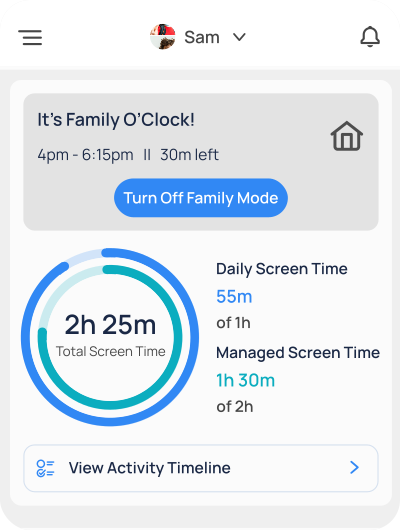
Mobicip's Activity Summary helps you track screen time, apps, and browsing habits across all your child's devices.
Ensure Online Safety & Well Being
Concerned about your child's digital habits? Mobicip's Activity Summary lets you easily track screen time, app usage, and browsing history helping you build healthier online habits. Mobicip ideal for parents seeking a comprehensive Parental Control Dashboard or a smart Online Monitoring App.
Key Features & Benefits
Screen Time Management
Monitor daily screen time and set healthy limits tailored to your child's needs.
App & Social Media Usage
Track time spent on social media, video, chat, and gaming apps.
Detailed Browsing History
Review websites and videos accessed, and block inappropriate content instantly.
URL and App Access Requests
Easily manage requests for more screen time or app access directly from your dashboard
Location History
View the places your child visits to ensure they stay safe.
Why Parents Love Mobicip?

Mobicip gives me peace of mind knowing what my kids are doing online.
I love how I can manage all devices from one place.
Awards & Recognitions
 Honoring Excellence
 Gold Recipient
 Trusted Provider
 Satisfaction Guaranteed
Frequently Asked Questions

Mobicip's Activity Summary provides insights into your child's screen time, app usage, location and browsing habits through an intuitive dashboard.
Yes, Mobicip supports multiple devices across iOS, Android, Windows, Chromebook, Kindle fire and MacOS platforms.
Yes, you'll receive daily/weekly summaries via email, so you're always informed.
Download Mobicip Parental Control




Works with iOS, Android, Windows, Chromebook, MacOS and Kindle fire.
Download
Mobicip Parental Control
Works with iOS, Android, Windows,
Chromebook, MacOS and Kindle fire.
Related Articles & Resources

Find your child’s online activity insights with Mobicip
Mobicip activity summary insights provide parents with a comprehensive view of their child's online behavior and screen time habits.Did you know 70%...
How Mobicip Makes Managing Your
Child’s Devices Easy
The Importance of Digital SafetyRemember when
the most prominent danger kids faced was
getting
scraped knees from playing outside? Ah, those wer...

How to Discuss Online Privacy with
Your Teen: Tips for Parents
Understanding Online PrivacyOnline privacy is not
just a matter of controlling personal
information
shared online. It’s a crucial aspect for teens, as thei...